What Jawab24 Does
Jawab24 is an AI agent that answers your customers on Facebook, Instagram, and WhatsApp. When a customer comments on your post or sends you a direct message, Jawab24 reads their question, checks your product catalog and business information, and sends an accurate reply — automatically, 24/7.
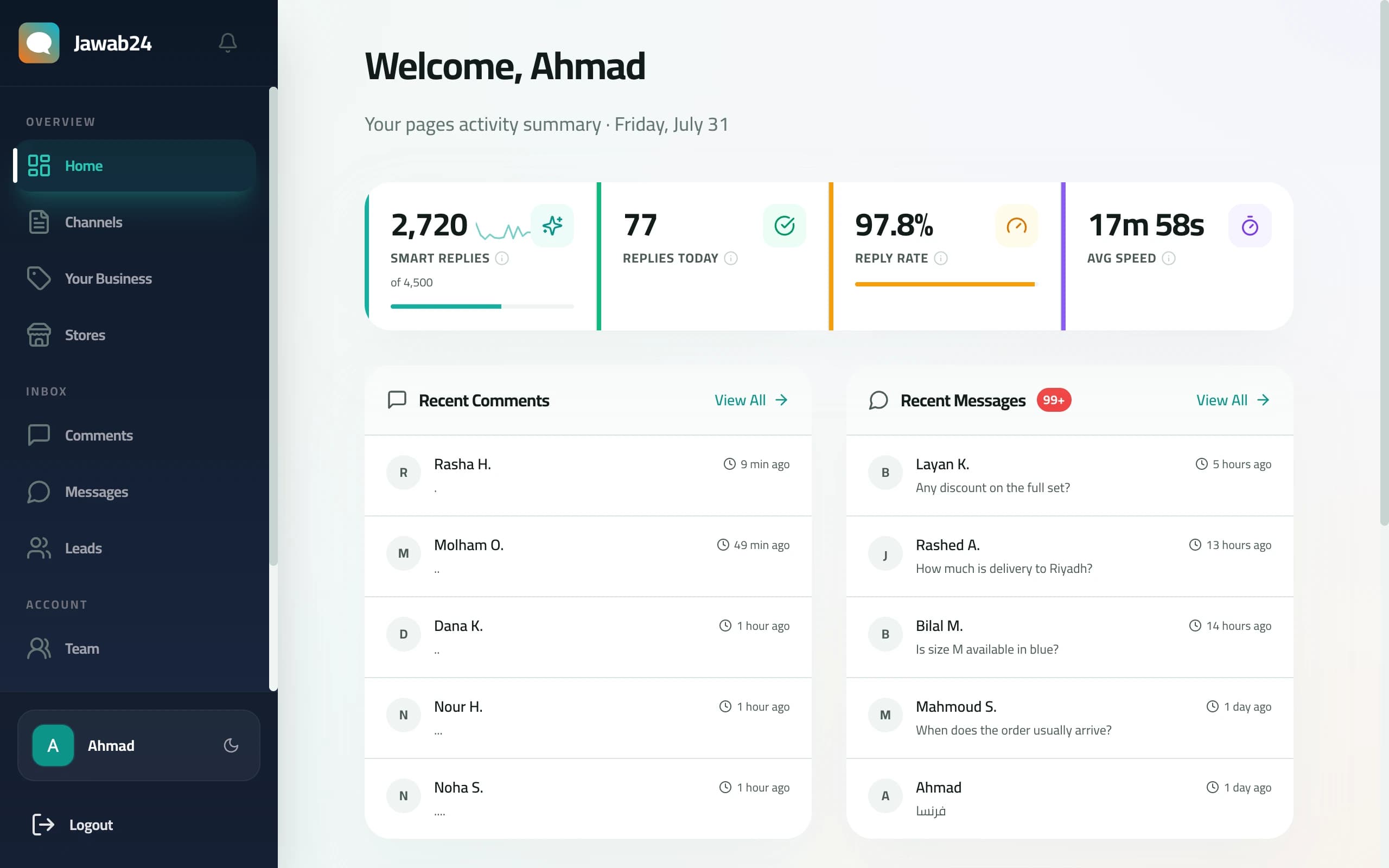
Unlike traditional chatbot tools that require you to build decision trees and flowcharts, Jawab24 uses AI that works out of the box. No flow building, no keyword mapping, no technical setup. You add your business information, and the AI figures out how to respond to customers naturally.
What makes it different from generic chatbot tools:
- Multilingual with dialect awareness — Jawab24 currently supports English and Arabic, with Arabic covering 6 dialect families (Gulf, Egyptian, Levantine, Maghrebi, Iraqi, and MSA). Turkish, Swedish, and German are coming soon. If it can handle 6 Arabic dialects, it can handle any language
- Conversation context — The AI loads the last 12 messages in each conversation, so it understands follow-ups. When a customer says "and how much is this one?", the AI knows what "this one" refers to from conversation history
- 99.6% accuracy — Tested across 125 real-world scenarios covering product questions, complaints, follow-ups, and edge cases. This is a published benchmark, not a vague "powered by AI" claim
- E-commerce integration — Native Shopify, Salla, and Zid support with automatic product sync, so the AI always has your latest prices and availability
- Price hallucination prevention — A two-tier verification system checks every price the AI mentions against your actual catalog before sending. If the price doesn't match, the reply is held with a safe fallback
- Angry customer detection — The AI identifies frustrated customers and sends instant push notifications to your phone so you can intervene personally
- Confidence scoring — When the AI is unsure about an answer, it flags the reply for your review instead of sending a potentially wrong response
Whether you're a solo merchant handling 20 comments a day or a growing brand with hundreds of daily interactions, Jawab24 keeps your customers engaged while you focus on your business.
Connecting Your Channels
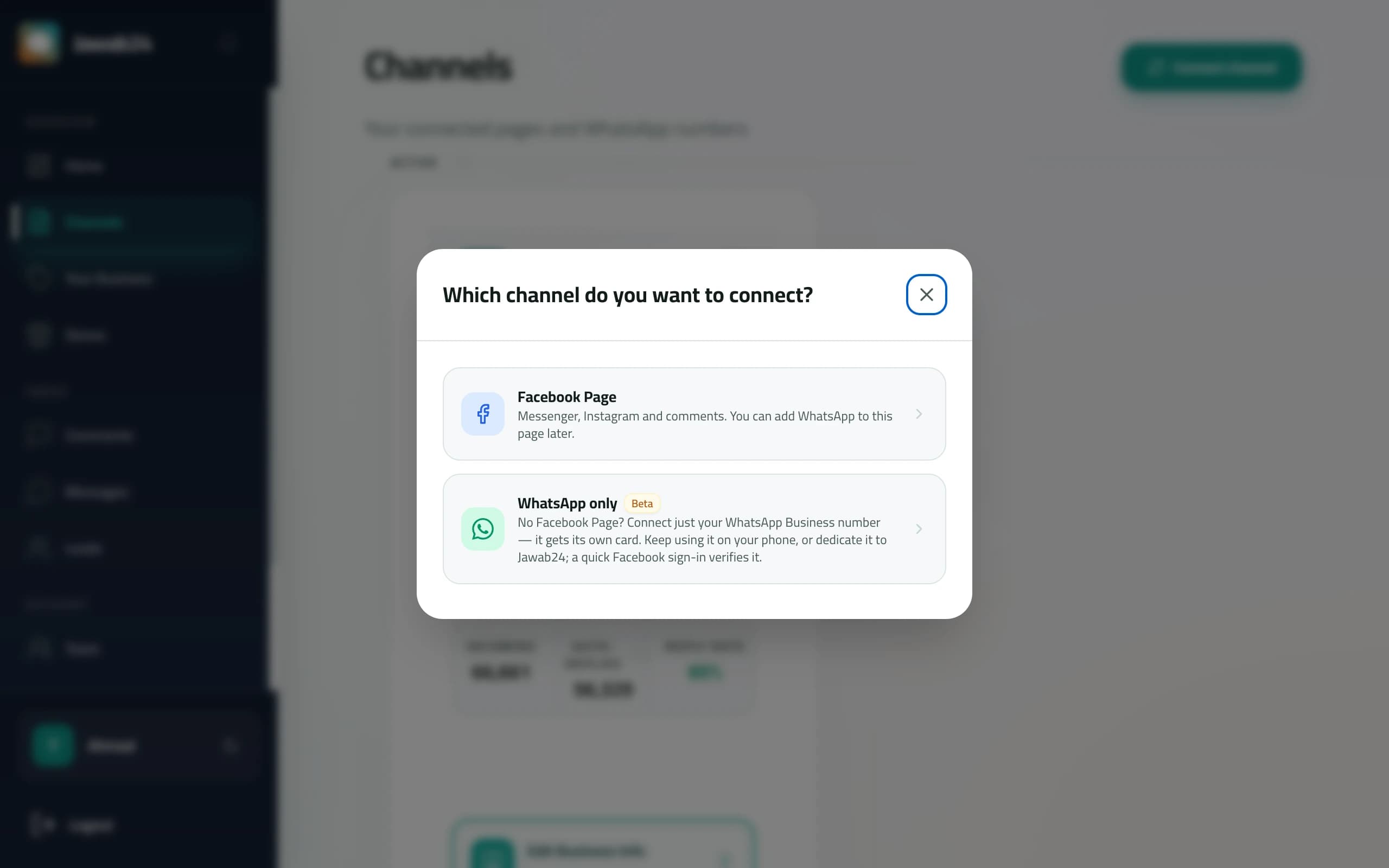
From Channels in your dashboard, Connect channel is the single starting point for everything.
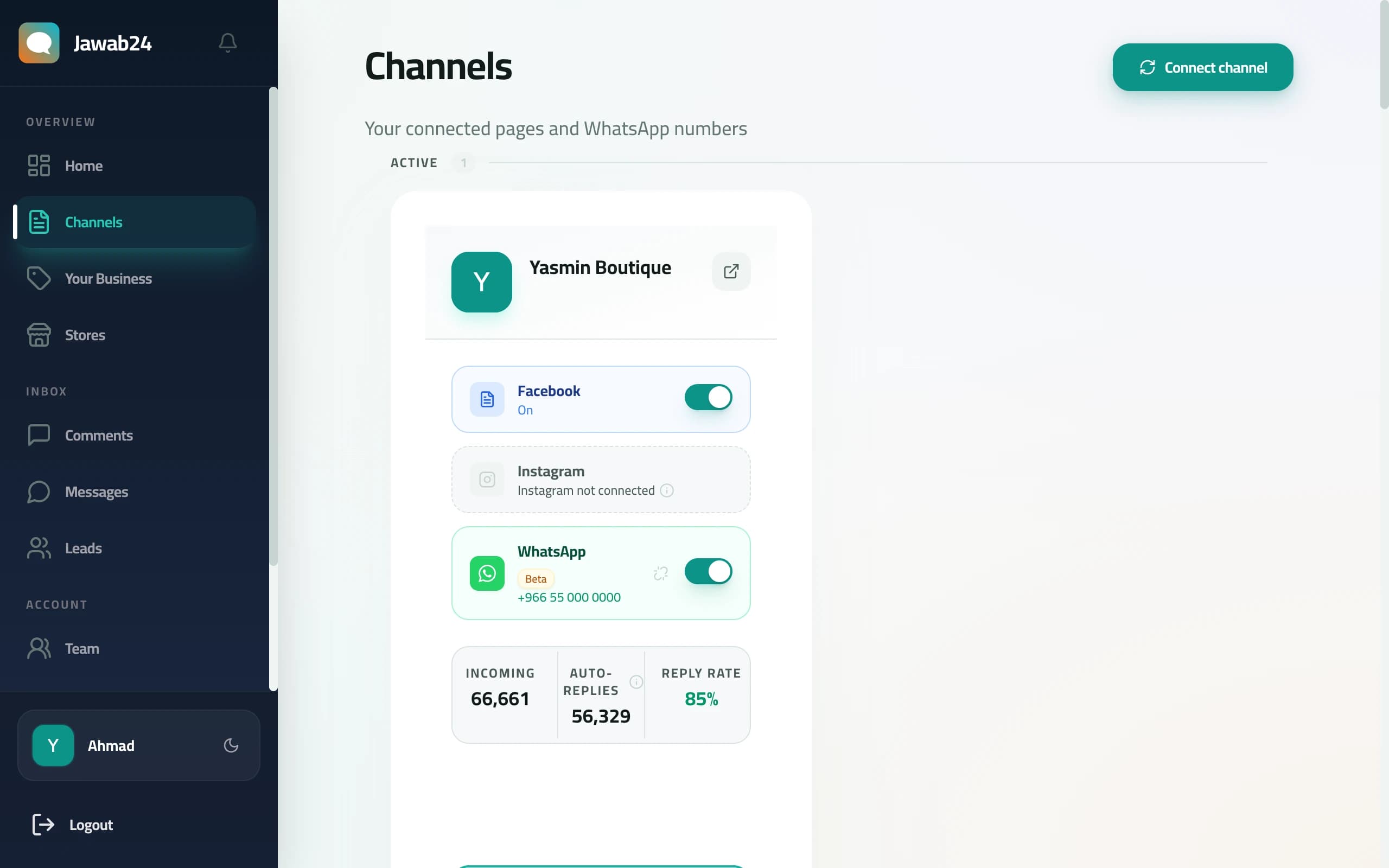
It asks which channel you want: a Facebook Page, or a WhatsApp number on its own.
Facebook and Instagram
Connecting your Facebook page also grants access to the Instagram business account linked to it, so both channels arrive together.
What you need before starting:
- A Facebook Business Page (not a personal profile)
- An Instagram Business or Creator account linked to that Facebook page (if you want Instagram auto-replies)
- Admin access to the Facebook page
How to connect:
- Sign up at jawab24.com and log in to your dashboard
- Click "Connect channel", then choose Facebook Page — this opens Facebook's authorization screen
- Select your page from the list and grant the requested permissions
- Confirm — you'll be redirected back to Jawab24 with your page connected
What permissions are requested and why:
- Page messages — allows Jawab24 to read incoming messages and send replies in Messenger
- Page metadata — allows reading your page information and post details
- Instagram messages — if your Instagram is linked, allows reading and replying to Instagram DMs and comments
All permissions follow Facebook's official API guidelines. Jawab24 never posts on your behalf, never modifies your page content, and never accesses your personal Facebook profile.
After connecting, you'll see your page name and profile picture on the dashboard. Any new comments or messages will start appearing in real-time — but auto-reply won't activate until you complete the setup.
You do not need a Facebook Page for this one. If you sell through a store or purely through WhatsApp, choose WhatsApp only and the number gets its own card with its own business information. A quick Facebook sign-in is still used to verify you, but no Page is required.
Jawab24 then asks one question before handing you to Meta: is this number already in use on the WhatsApp Business app, or is it a spare number dedicated to Jawab24?
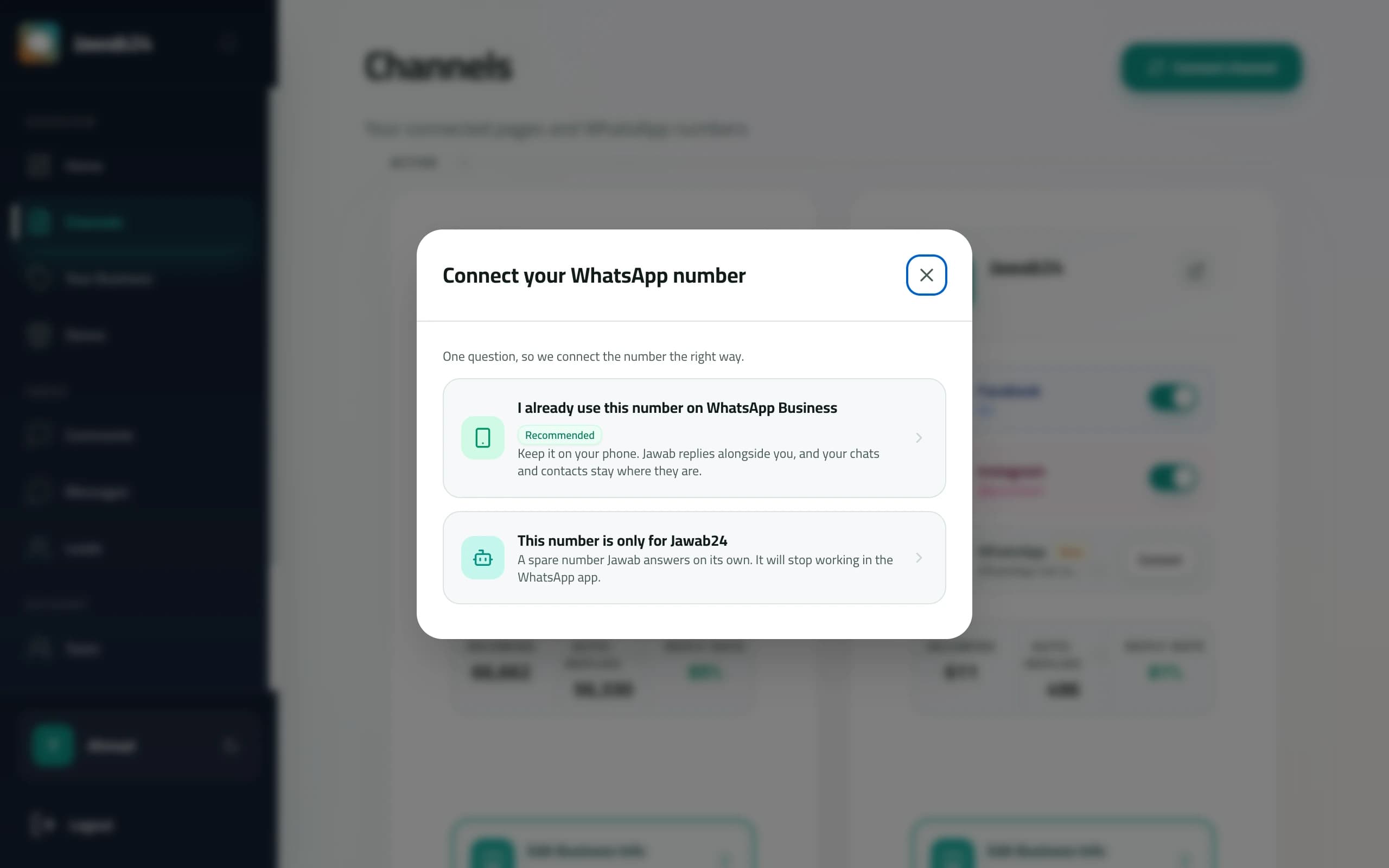
- Already on the WhatsApp Business app — keep using it on your phone exactly as before. Jawab24 answers alongside you, and your existing chats stay where they are.
- A dedicated number — Jawab24 answers on it by itself, and it stops working in the WhatsApp app.
Pick the first option if the number is your everyday business line. WhatsApp is available on the Starter plan and above.
Setting Up Your Business Info
Your Business Info is the foundation of accurate auto-replies. Think of it as the AI's brain — it will only use information you provide here. It never invents answers.
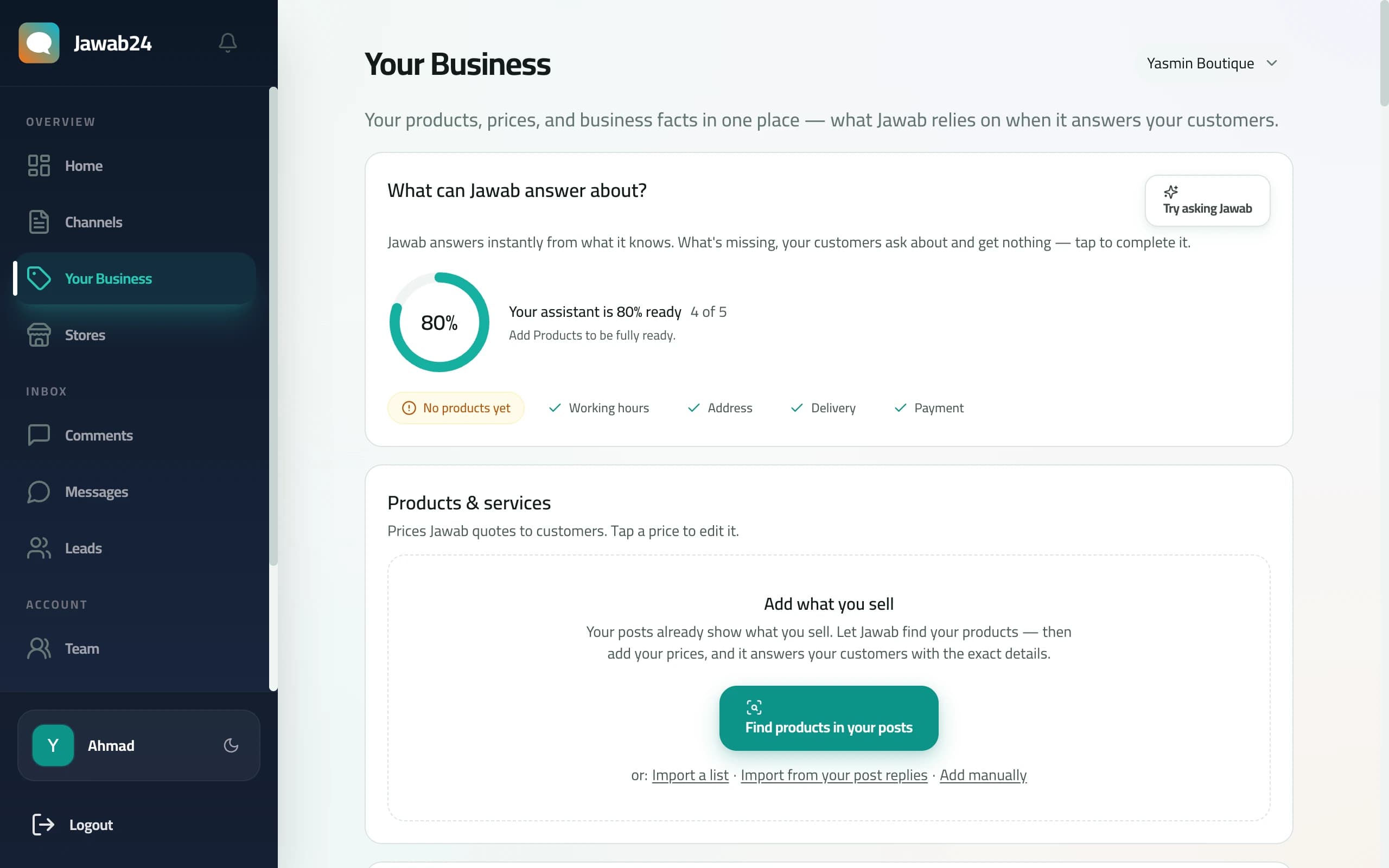
The Your Business page shows a readiness meter that tells you exactly what's complete and what's missing — working hours, address, delivery, payment, and products.
This is the key difference from flow-based chatbot tools: instead of building conversation trees and mapping every possible customer question to a response, you simply describe your business. The AI handles the conversation logic on its own.
What to include:
- Products and pricing — If you connect Shopify or Salla (covered in the next section), this happens automatically. Otherwise, add your key products manually with names, prices, and descriptions.
- Shipping policy — Delivery zones, timeframes, costs. Example: "We deliver to all cities within 2-3 business days. Shipping is free for orders over $50."
- Return and exchange policy — Return window, conditions, process. This is one of the most commonly asked questions after pricing.
- Payment methods — What you accept: cash on delivery, credit cards, Apple Pay, online payment gateways, etc.
- Frequently asked questions — Anything customers regularly ask that isn't covered above. Sizing guides, materials, warranty, care instructions.
- Business information — Store location (if physical), working hours, contact methods.
Tips for strong Business Info:
- Be specific. "Shipping takes 2-3 days to major cities and 4-5 days to other areas" is better than "Shipping takes a few days."
- Write naturally. The AI uses your text as a reference, not a script. Write as you'd explain things to a customer.
- Include both languages if your customers use both Arabic and English. The backend automatically translates your content, but providing both versions ensures accuracy.
- Update regularly. When you change a policy or add a new product category, update your Business Info. Outdated information leads to wrong answers.
Configuring Auto-Reply Settings
With your Business Info ready, configure how and when Jawab24 replies to customers from the Settings page.
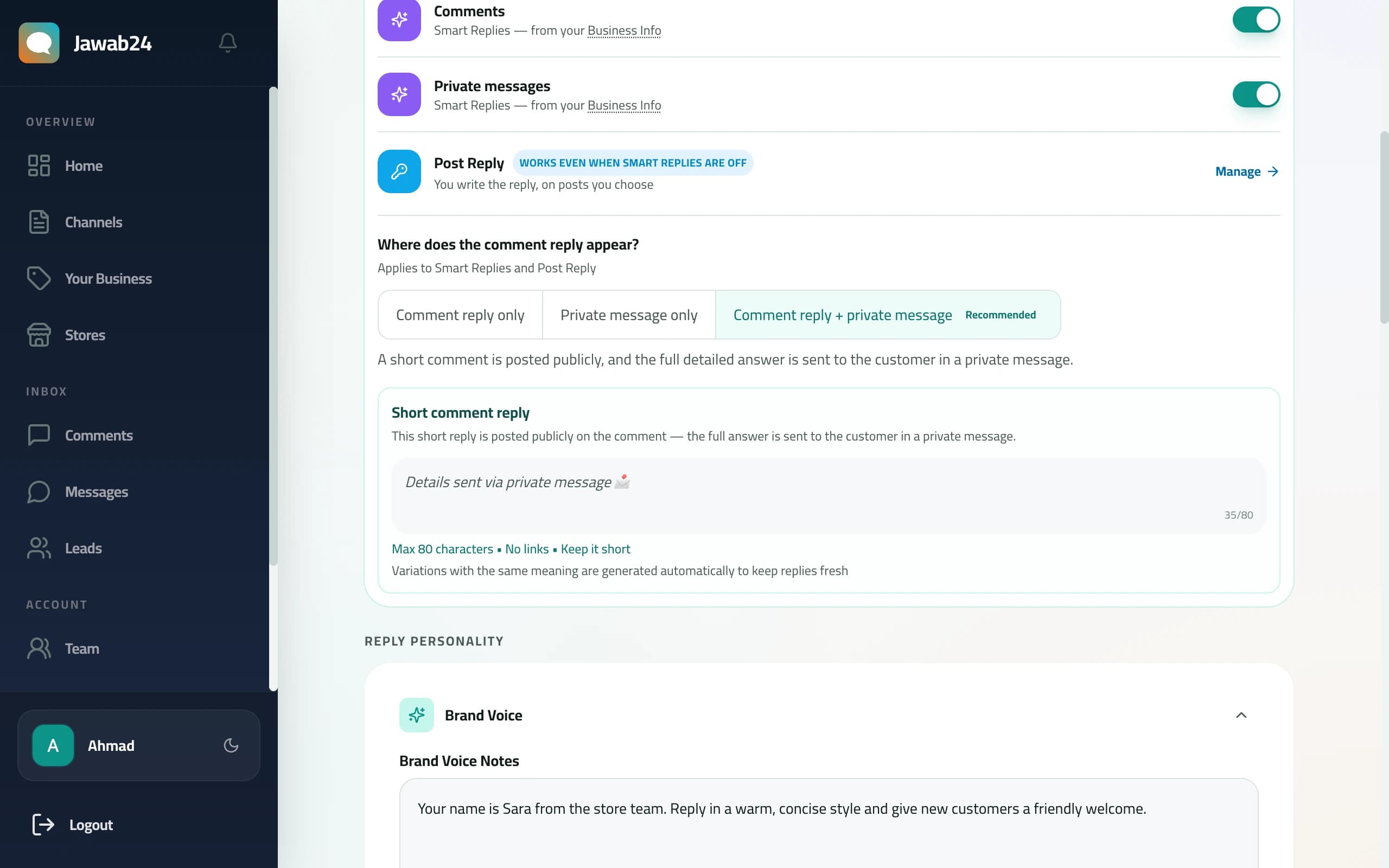
Business Hours
Define when auto-reply is active. During business hours, the AI responds with intelligent, context-aware replies using your Business Info.
Outside business hours, Jawab24 sends your away message instead — a simple preset message like "Thanks for reaching out! We'll get back to you when we're back online." This prevents the AI from handling complex inquiries when you're not available to monitor.
Reply Style
Choose the tone that matches your brand:
- Professional — Formal, polished language. Best for premium brands, B2B services, and corporate pages.
- Casual — Friendly, conversational tone. Best for lifestyle brands, fashion, and food businesses.
- Enthusiastic — Energetic and warm. Best for brands that want to convey excitement and positivity.
The reply style affects tone only — the AI's accuracy and information stay the same regardless of style.
Comment Reply Mode
For comments on your posts, choose how Jawab24 delivers the answer:
- Comment reply only — The AI replies directly on the comment for everyone to see
- Private message only — The AI sends the commenter a private message with detailed information
- Comment reply + private message — A short, friendly public comment (like "Thanks for asking! Check your DMs for details") plus a detailed private message with full product information, pricing, and ordering instructions
Comment reply + private message is particularly effective for sales-oriented pages. The public reply shows other followers that you're responsive, while the private message gives the customer all the details they need to purchase. The short public comments rotate automatically with different wording variations to avoid looking repetitive or triggering spam detection by Facebook.
Away Message
Your away message is sent when auto-reply is inactive (outside business hours or when you manually pause it). Write something helpful:
- Let customers know when you'll be back
- Provide alternative contact methods if urgent
- Keep it warm and professional
You can write your away message in either Arabic or English — Jawab24 automatically translates it to the other language so customers always receive a message in their preferred language.
Greeting Message
The greeting message goes to first-time customers who message your page. It sets the tone for the relationship. A good greeting:
- Welcomes the customer by feeling personal
- Briefly explains what your business does
- Invites them to ask their question
Like the away message, it's automatically translated for bilingual support.
Preset Replies
For common questions that always have the same answer, you can create preset replies with keyword triggers. For example:
- Trigger: "hours", "working hours", "open" — Reply: "We're open Saturday to Thursday, 9 AM to 9 PM."
- Trigger: "location", "address", "where" — Reply: "Our store is at [address]. Here's the Google Maps link: [link]"
Preset replies are checked before the AI generates a response. If a keyword matches, the preset reply is sent instantly — faster and cheaper than an AI-generated reply. They also save your Smart Reply credits.
Deduplication: If a preset reply was already sent earlier in the same conversation, Jawab24 won't send it again. Instead, the AI generates a fresh contextual reply for the follow-up. This prevents the robotic experience of receiving the same canned response twice.
Connecting Your Store and Going Live
Syncing Your Shopify, Salla, or Zid Store
If you sell on Shopify, Salla, or Zid, connecting your store is the single most impactful thing you can do for reply accuracy.
To connect Shopify:
- Go to Settings, then Integrations in your Jawab24 dashboard
- Click Connect Shopify
- Enter your Shopify store URL (e.g.,
your-store.myshopify.com) - Authorize on Shopify's page
- Your products sync automatically — names, prices, descriptions, variants, and availability
To connect Salla:
- Go to Settings, then Integrations
- Click Connect Salla
- Authorize on Salla's OAuth page
- Products sync automatically within seconds
To connect Zid:
- Go to Settings, then Integrations
- Click Connect Zid
- Authorize on Zid's OAuth page
- Your entire Zid catalog — products, prices, descriptions, and availability — syncs automatically
For a detailed walkthrough of the Zid integration, see our Zid store setup guide.
After the initial sync, updates happen in real-time through webhooks. When you change a price or mark something out of stock, the AI knows immediately.
How Price Verification Works
Once your store is connected, Jawab24's 2-tier price hallucination prevention protects you from pricing errors:
- First check: The AI's generated reply is scanned for any mention of a price (numbers near currency symbols like $, SAR, SR, EUR, or other currency markers)
- Second check: Every detected price is compared against the actual price in your synced product catalog
If a price matches, the reply sends normally. If a price doesn't match — maybe the AI recalled an old price or made a mistake — the reply is held and replaced with a safe fallback that directs the customer to check the product page without mentioning a specific number.
This matters because a wrong price sent to a customer can mean either a lost sale (price too high) or a loss (customer expects the lower price you accidentally quoted). The verification happens automatically on every reply — no configuration needed.
Testing Before Going Live
Before letting Jawab24 reply to real customers, test thoroughly:
- Send a test comment from a personal Facebook account on one of your business page's posts. Ask about a specific product — "How much is [product name]?"
- Check the reply — it should appear within seconds with accurate pricing from your store
- Test an FAQ — ask about shipping or returns and verify the answer matches your Business Info
- Test in different languages — if your customers use Arabic, comment in Arabic and check that the reply is natural. Try English too
- Test edge cases — ask about a product that doesn't exist, or ask something your Business Info doesn't cover. The AI should admit it doesn't know rather than making something up
- Test follow-up questions — ask about a product, then send a follow-up like "and in black?" or "how long for delivery?" to verify the AI maintains conversation context
Features to Explore After Setup
Once you're live, here are Jawab24 features worth exploring:
Smart message consolidation — When a customer sends multiple rapid messages ("How much is this?", "Is it available?", "Do you deliver?"), Jawab24 waits briefly and generates one comprehensive reply instead of three separate responses. This feels more natural and avoids overwhelming the customer.
Voice message understanding — When a customer sends a voice message instead of typing, Jawab24 automatically transcribes the audio and processes it like any text message. The AI understands the question and replies with a text message. This is especially valuable in Arabic-speaking markets where voice messages are the preferred way to communicate on Messenger and Instagram.
Angry customer push notifications — If a customer sends a frustrated message, you'll get an instant push notification on your phone. You can open the app, read the full conversation, and step in personally. The AI's empathetic auto-reply buys you time while you get there.
Auto-pause on manual reply — When you reply to a customer manually, Jawab24 automatically pauses auto-reply for that conversation. You can have a human conversation without the AI jumping in. No toggle to flip — it detects your manual reply and stays out of the way.
KB gap detection — The dashboard shows what customers asked about that wasn't covered in your Business Info. Instead of guessing what to add, you see real gaps based on actual customer questions. This makes Business Info maintenance data-driven instead of guesswork.
Monitoring the Confidence Dashboard
Once you're live, the confidence dashboard becomes your most important tool. It shows:
- High-confidence replies — The AI was confident in its answer. These are usually fine, but spot-check a few daily.
- Low-confidence replies — The AI wasn't sure. Review these carefully. Each one is a signal that your Business Info might be missing information.
- Flagged replies — Price mismatches or replies the AI held for review. Address these immediately.
The feedback loop: Review low-confidence replies, identify what information was missing, add it to your Business Info, and watch future replies improve. Most businesses see significant accuracy improvements within the first week of active monitoring.
You're Live
Once you've tested and are satisfied with the replies, you're done. Jawab24 handles the rest — 24/7, in your customer's language and dialect, with accurate product information from your store.
Check the dashboard daily for the first week, then weekly as your Business Info matures. The more complete your business information, the fewer low-confidence replies you'll see.
Keep Reading
Auto Reply for Clinics and Beauty Centers: A Receptionist That Never Sleeps
Your clinic gets the same question dozens of times a day: "How much is a session?" "When are you open?". Here's how an AI employee answers every message instantly — with no online store and no website.
6 min readGuidesAuto Reply for Training Centers: Every Course Announcement Floods You with Questions — Here's Who Answers Them
"How much is the course?" "When does it start?" "Is registration open?" — a real institute had Jawab24 answer 44,636 of its messages in 90 days and collect 472 prospective registrants. Here's how that works.
6 min readReady to Automate Your Replies?
Start your free trial — no credit card required.
Try Jawab24 Free© 2026 Jawab24